|
|||||||
Speaking Notepad
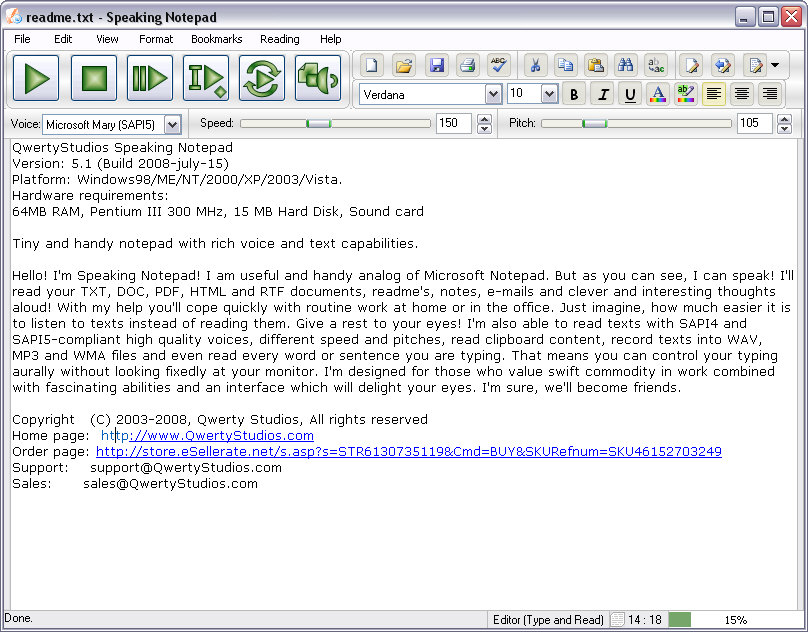
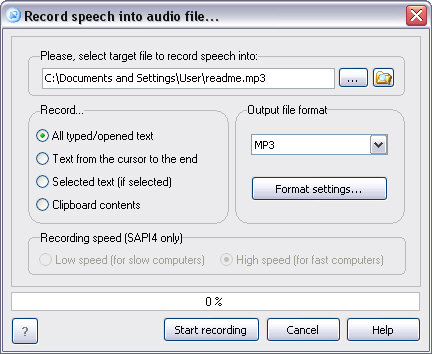
Speaking Notepad 5 Current version: 5.2 Platform: Windows 98/Me/2000/XP/2003/Vista/Seven Download size: 1.98 MB Single licence price: $29.95 USD Download | Buy now! | Overview | Screenshots | System requirements | FAQ | User comments What is Speaking Notepad?Speaking Notepad is handy text editor with powerful text-to-speech capabilities. Speaking Notepad will read your TXT, RTF, DOC, HTML and PDF documents with SAPI4 and SAPI5-compliant high quality voices, different speed and pitches, read clipboard content, record texts into WAV, MP3 and WMA files and even read every word or sentence you are typing. How Speaking Notepad 5 differs from previous versions?
OverviewSpeaking Notepad is handy text editor with powerful text-to-speech capabilities. Speaking Notepad will your TXT, RTF, DOC, HTML and PDF documents, readme's, notes, e-mails and clever and interesting thoughts aloud. With its help you'll cope quickly with routine work at home or in the office. Just imagine, how much easier it is to listen to texts instead of reading them! Give a rest to your eyes! The program will read texts with SAPI4 and SAPI5-compliant high quality voices, different speed and pitches, read clipboard content, record texts into WAV, MP3 or WMA files and even read every word or sentence you are typing. That means you can control your typing aurally without looking fixedly at your monitor. Speaking Notepad is designed for those who value swift commodity in work combined with fascinating abilities and an interface which will delight your eyes. It will definitely become your best friend. Before you buy Speaking Notepad please look through its main advantages over standard Notepad:
Download additional voices and speech engines for Speaking Notepad
Main features
If you feel that should have more features or functions, please write us - manager@qwertystudios.com - and tell, what features do you want us to include into program. We can also create custom build of program with specific capabilities specially for your company or team. Additions for Speaking Notepad
TestimonialsRead Speaking Notepad Review from Top Software Reviews blog. Speaking Notepad is a tool that will catch your attention for sure! Speaking Notepad is a software that speaks your text out aloud. Its features don't end here! You can save your text as a .WAV or a .MP3 file!
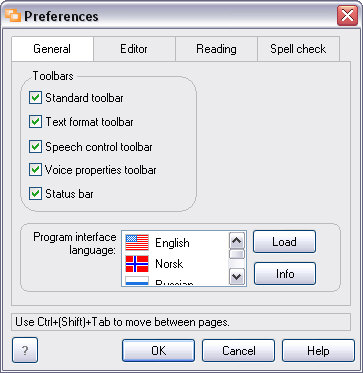
Imagine the kind of things you can do with a software like that. Ashwin Yerra If i may, i would like to say that your product, speaking notepad, is proving itself to be one of the most usful programs i've ever perchased. i have a sever learning disablity, but your program as allowed me to almost double my reading intake, not only that but my writing is improving as well. now i am able to listen to an impartial reader of what i have written, and hear from a third party perspective what my writing might sound like to other people. Zach Smith ScreenshotsHere you can view screenshots of Speaking Notepad. Click on image to enlarge.
TroubleshootingTrouble: Program shows critical error after starting/during work/at exiting under Windows Vista. How to solve this problem? Our answer and solution: The reason of the problem is Windows Vista security system for newly installed applications. To solve it you should allow Windows Vista to start Speaking Notepad after its first run. System Requirements
Frequently asked questions (FAQ)Questiom: What additional files does Speaking Notepad require? Answer: Speaking Notepad requires Microsoft Text to Speech Engine, Microsoft Speech API (SAPI) and at least one TTS Voice installed in your system You can download SAPI 4 from this link and Lernout & Hauspie TruVoice Amer. Eng. TTS Engine from this link. However, in normal situation you need not download them manully because Speaking Notepad's installer does this automatically. User commentsKenneth Smith (7 Oct 2008, 08:09) I love Speaking Notepad! I've used for years to give my computer life and as a valuable text editing tool. It's an awesome tool that is fun to use.
sureshtekwani (7 Jun 2009, 09:03) Most amazing snd very useful programme. Thanks!Regards!
Dr Kamta (22 Aug 2009, 08:02) I have been using Speaking notepad for more than two years and I am very happy with this super software.It is so easy to use and for a busy person it is ideal.I convert endless files and listen to them on the go.
Svein Knutsen (17 Mar 2010, 03:18) I am extremely satisfied with Speaking Notepad, and I am enjoyiing it more
and more as I learn to use it. Thank you for a very good and helpful
program. :)
Marlene Cvetko (10 Jun 2010, 12:54) I have been teaching disabled students to convert text to audio easily and listen to their text. It's easy. It is an awesome program!
Naren (29 Dec 2010, 09:50) It is Very Simple And Soft
Andreaw (10 Apr 2011, 22:58) can it read spanish or chinese, or italian or other language?
Support Staff (11 Apr 2011, 07:28) Andreaw, yes. Speaking Notepad can read text in any language if you have installed the appropriate voices.
santi (1 Aug 2011, 18:10) can i improve the programs?
Support Staff (2 Aug 2011, 07:08) Santi, surely you can help us improve our programs! Just let us know what you'd like to be improved or changed and how?
>can i improve the programs?
Ra??l Perell?? Alonso (13 Aug 2012, 12:29) Please. Can you tell me why not work on my PC programs Qwerty Studios? I get the following error message:
SpeakingNotepad.exe have encountered a problem and needs to close.
Thank you very much.
|